Understanding Unity Assembly Definition (asmdef) Use GUIDs Option
Understanding the Use GUIDs checkbox in Unity asmdef inspector and differences between GUID vs name references
Understanding Unity Assembly Definition (asmdef) Use GUIDs Option
When working with Assembly Definition Files (asmdef) in Unity, you’ll notice a Use GUIDs option. New and existing asmdef files may display references differently - this is due to that option.
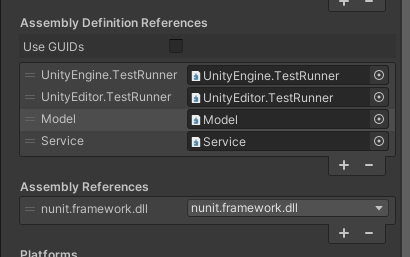
The Problem
When referencing other assemblies in the asmdef inspector:
- Older files:
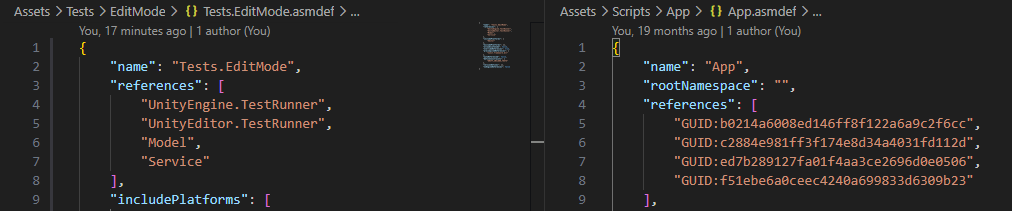
GUID:861626f26602c48888a26b...(displayed as GUID) - Newly created files:
Model,Service(displayed as names)
Why does this difference occur?
The Cause: Use GUIDs Option
There’s a Use GUIDs checkbox at the top of the asmdef inspector.
Use GUIDs Checked ON (Recommended)
{
  "reference": "GUID:861626f26602c48888a26b..."
}
Use GUIDs Checked OFF
{
  "reference": "Model"
}
New asmdef files have Use GUIDs enabled by default, while older files may not.
GUID vs Name Reference Comparison
| Aspect | GUID Reference | Name Reference |
|——–|—————–|——————|
| Storage format | "GUID:..." | "AssemblyName" |
| Readability | Low (GUID string) | High (intuitive) |
| Renaming safety | ✅ Safe (survives renames) | ❌ Risky (breaks references) |
| Team collaboration | ✅ Fewer conflicts | ❌ Possible name conflicts |
| Manual editing | Difficult | Easy |
| Unity version | 2019.1+ | 2019.1+ |
| Merge conflicts | ✅ Handled by Unity | ❌ Manual resolution needed |
Unity 2019.1 Patch Notes
This feature was introduced in Unity 2019.1.
Background
Before 2019.1, asmdef files could only reference other asmdefs by assembly name. Critical issues:
- When referenced assembly name changes → All references break (Missing Reference)
- Multiple projects with same name → Potential conflicts
To solve this, GUID-based reference using meta files was added.
Official Release Notes
Editor: Added support for referencing Assembly Definition Files with GUIDs instead of assembly names. Enable with ‘Use GUIDs’ option in Assembly Definition File inspector. Enabled by default for new Assembly Definition Files.
Recommendations
For New Projects
- ✅ Always enable Use GUIDs
- Consistent approach across team
- Future-proof for renaming
For Existing Projects
- Open each asmdef file in Inspector
- Check Use GUIDs checkbox
- Unity automatically converts name references to GUIDs
- Commit changes to version control
Migration Notes
- Requires Unity 2019.1+
- Existing name references preserved until manual conversion
- Package publishers should enable GUIDs for better compatibility
Summary
Use GUIDsON: Stores references as GUIDs → Rename-safeUse GUIDsOFF: Stores references as names → Readable but risky- Unity 2019.1+ feature
- New asmdef files have Use GUIDs enabled by default
- Existing files may need manual enable
💡 TL;DR: Enable Use GUIDs to prevent broken references when assembly names change. Unity 2019.1+ feature.